Email reports
Schedule a recurring report for team members.
Email reports sends a selected report to organization members. Manage it under Settings → Email reports. Only admins can manage this section.
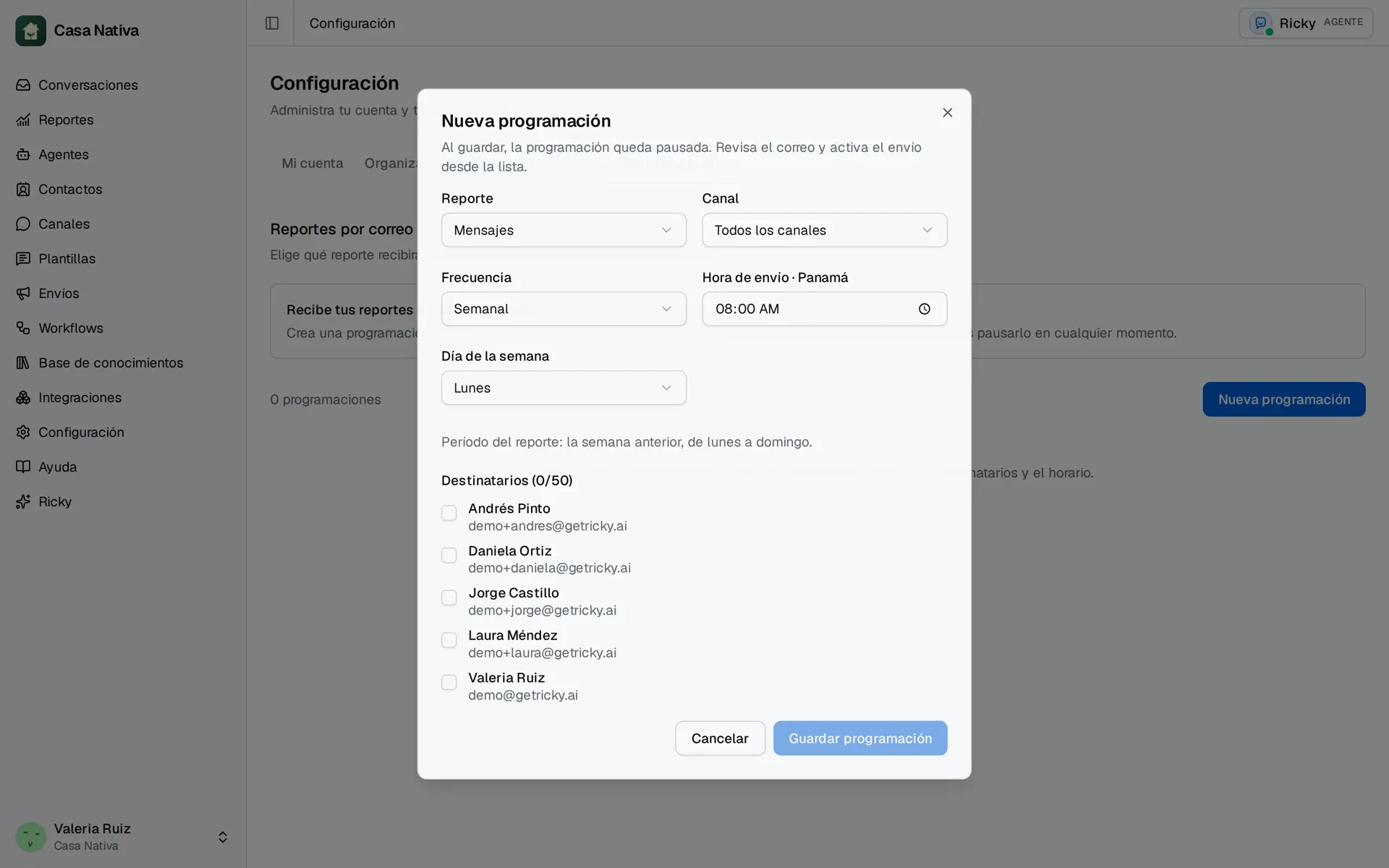
Demo organization: Casa Nativa. Interface shown in Spanish.
Create and turn on a schedule
- Select New schedule.
- Choose a Report: Conversations, Responses, Resolutions, Team, Messages, or Broadcasts.
- Choose Channel, Frequency, and Send time · Panama. For weekly or monthly reports, choose a day too.
- Select team Recipients and use Save schedule.
- In the list, use Preview email to inspect the result.
- Select Activate. Later you can Pause, Edit, or Delete the schedule.
Saving leaves the schedule paused; no email is sent until you activate it. You can select 1 to 50 team recipients. A daily report covers the full previous day; a weekly one covers the previous Monday-to-Sunday week; a monthly one covers the full previous month. Monthly days run from 1 to 28. All times on this screen use Panama time.
If recipients are missing, check that those members still belong to the team and have email. Preview email sends nothing. In Recent deliveries, Accepted by provider does not confirm inbox delivery; check the recipient's inbox if it is missing.