Handle conversations
Review messages, assign owners or agents and reply manually.
The inbox brings together WhatsApp and Instagram conversations.
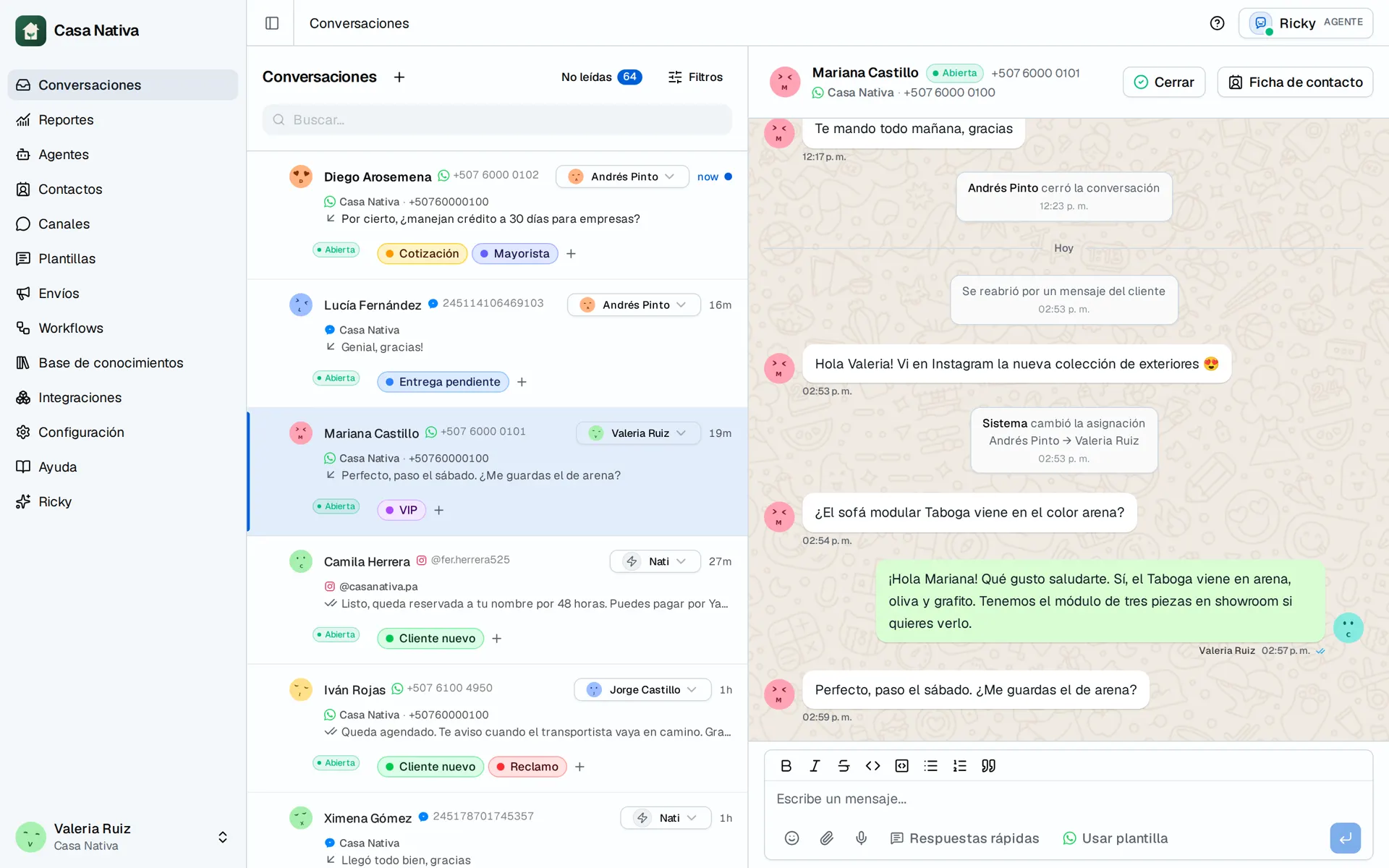
Demo organization: Casa Nativa. Interface shown in Spanish.
Open a conversation
- Open Conversations.
- Use the filters to choose the channel or account.
- Select a conversation.
The header shows the contact, the channel, the assigned agent and the AI status.
Assign a person or an agent
A conversation has a single assignment: a person, an AI agent or no one. When you assign a person, the AI stops replying automatically and that person also becomes the contact's owner in the CRM. When you assign an agent, the conversation goes back to automatic handling. This doesn't change the contact's owner in the CRM.
In multiple selection you can choose an agent or Unassigned (AI off). When there's a request for human help, you can use Take to handle it.
Reply manually
Type the message in the reply field and send it. On WhatsApp, if the 24-hour window is closed, use an approved template.
For text you repeat, use Quick replies: insert them from the composer and adjust them before sending.
Check the result
Confirm that the message appears in the timeline. Delivery statuses depend on the channel and the provider.